
[Claude Code for Devs-Part1] Claude Code Essential MD Files
From Prompts to Projects: How I Design Claude Code Agents Using Five Tiny Markdown Files

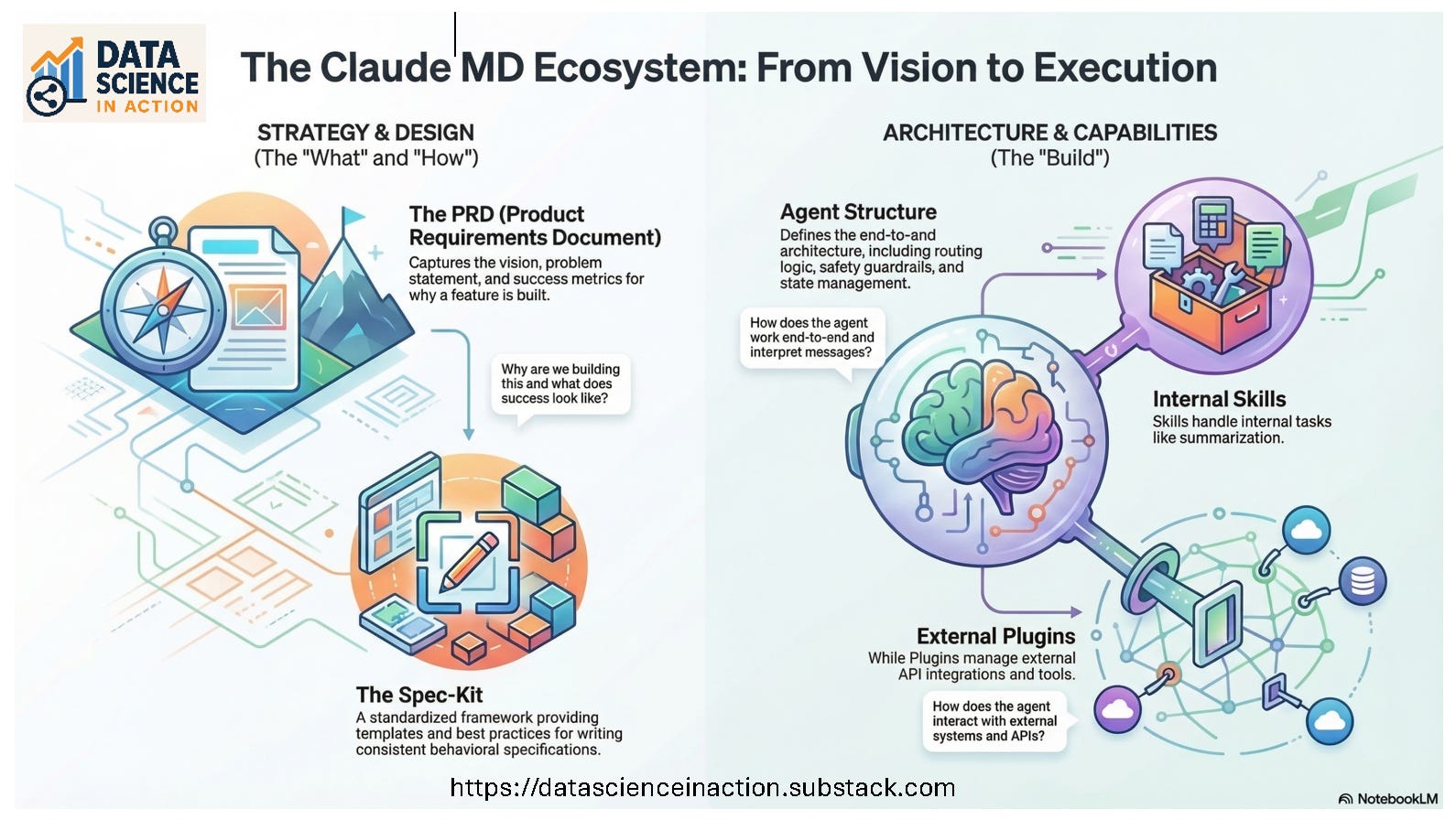
When I started working with Claude, I didn’t know where to start or what to learn, and the noise was deafening and overwhelming. At first, I was skeptical of this AI hype. I thought it would blow up soon, and the blurring dust would disappear. The reality is, AI is going to stay. This series I am starting today is taking you by the hand through a step-by-step process to explore this AI “war” zone.
In this article, we’ll talk briefly about the different types of files that you can use to create AI agents. In the next article, we’ll see how to install the Claude Code Extension in VS Code and start architecting, planning, and designing a simple application. In the third article, we’ll implement our plan. To be precise, in the third article, we’ll see how to use Claude Code as our AI Assistant to execute our plan and convert it to actual running code. These are the three basic articles I have in mind for this series right now. If these ideas light any bulbs for you and you want us to explore a certain path or app together, drop it in the comments or send me a message. I really appreciate all the emails and messages that you are sending. I am glad that you, the readers, are the captain of Data Science In Action Substalk and driving its direction.
What are the five markdown files?
In this article, I’ll show you the five markdown files I now reach for most of the time I start a new Claude Code project:
PRD
Spec‑Kit
Agent Structure
Skills
Plugins
It is not a must to have all of them or any of them to build an AI Agent or an Agentic system, but they save you thousands of tokens, free your context windows, and give memory and consistency to your agents.
These markdown files serve as structured context to help AI assistants (like Claude) work more effectively in your projects. These files act as a persistent memory layer for AI tools. Since LLMs have no memory between sessions, markdown files are a practical way to give them the context they need to be genuinely useful collaborators on your specific project, rather than generic assistants starting from scratch every time.
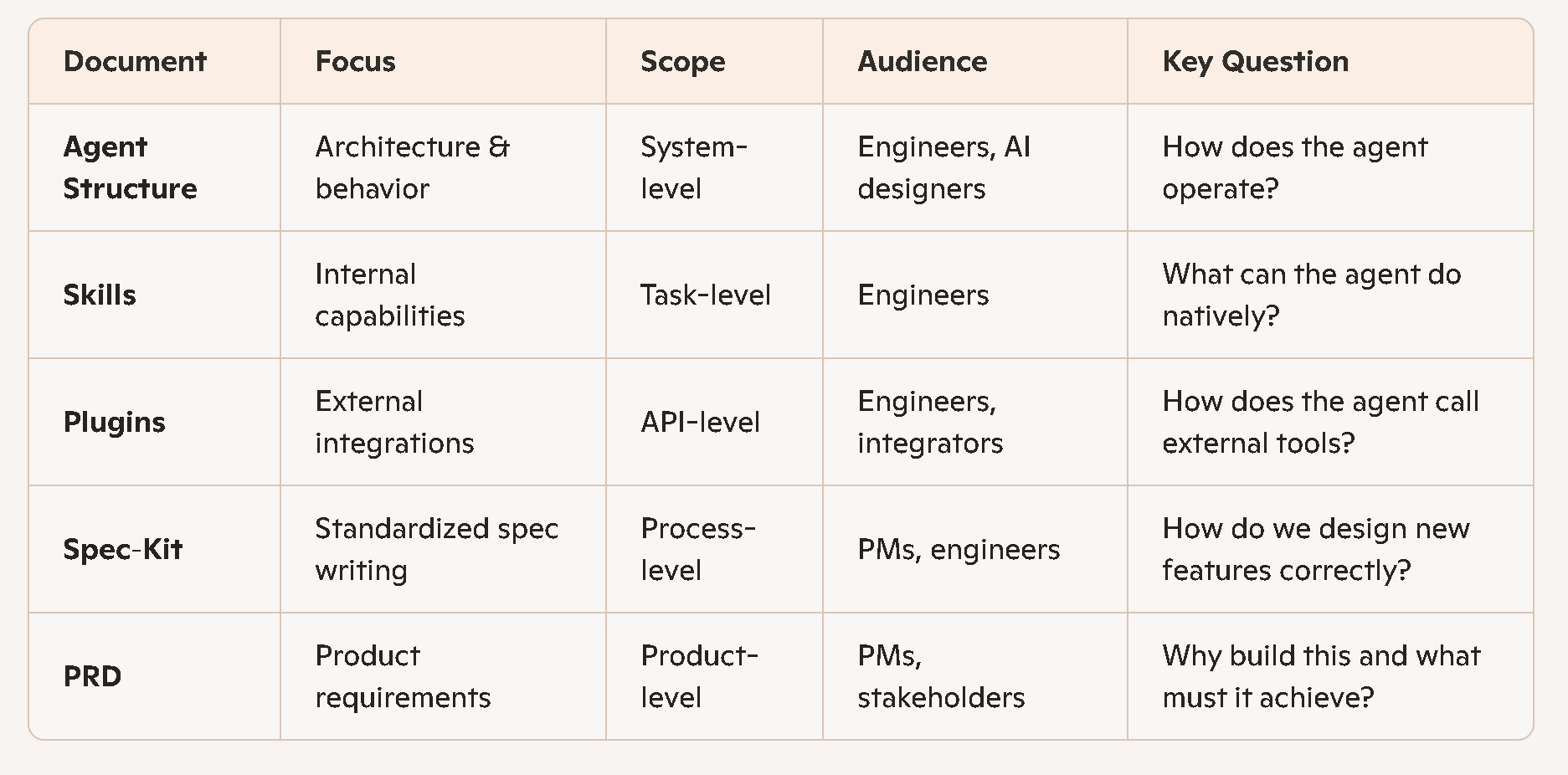
Comparison of Claude Structure MD Files
1. PRD (Product Requirements Document)
Purpose
Captures the product-level vision and requirements for a feature or agent.
Typical Contents
Problem statement
Goals and non‑goals
User stories
Acceptance criteria
Success metrics
Dependencies
Risks and mitigations
What It Answers
“Why are we building this?”
“What does success look like?”
“What must the agent or feature accomplish?”
2. Spec‑Kit
Purpose
Provides a standardized specification framework for designing new agent behaviors, tools, or workflows.
Typical Contents
Templates for writing specs
Definitions of required fields (goals, constraints, edge cases)
Best practices for designing agent behaviors
Evaluation criteria
Example specs
What It Answers
“How do I write a proper spec for a new feature or tool?”
“What structure should all specs follow?”
3. Agent Structure
Purpose
Defines the overall architecture of an AI agent built on Claude.
Typical Contents
High‑level agent lifecycle
How the agent interprets user messages
Routing logic (when to call tools, when to respond directly)
Memory model
Safety and guardrails
State management
Message schemas (input/output formats)
What It Answers
“How does the agent work end‑to‑end?”
“How does Claude decide what to do?”
4. Skills
Purpose
Defines capabilities the agent can perform internally without external APIs.
Typical Contents
Skill definitions (e.g., summarization, extraction, classification)
Input/output formats
When each skill should be invoked
Examples of skill usage
Constraints and limitations
What It Answers
“What can the agent do on its own?”
“How should Claude perform internal tasks?”
5. Plugins
Purpose
Describes external integrations that the agent can call.
Typical Contents
Plugin manifest format
Authentication requirements
API endpoints and schemas
Safety rules for plugin invocation
Error handling
Examples of plugin calls
What It Answers
“How does the agent interact with external systems?”
“What tools can Claude call beyond its internal skills?”

Summary Table
How They Fit Together (Workflow View)
PRD defines what needs to be built and why.
Spec‑Kit is used to write a formal spec for the feature.
Agent Structure defines how the new behavior fits into the agent’s architecture.
Skills define internal logic if the feature is self-contained.
Plugins define external interactions if the feature requires APIs or tools.
Are they Claude-specific files?
These files are completely universal, model-agnostic, and framework-agnostic.
Summary
These five markdown files — PRD, Spec‑Kit, Agent Structure, Skills, and Plugins — form a lightweight but powerful foundation for building AI agents. They give your assistant persistent memory, reduce token usage, and bring clarity and structure to your workflow. In the next article, we’ll put these concepts into practice by installing Claude Code in VS Code and starting to architect a real application together.