
Claude Code vs GitHub Copilot vs Codex vs Google Colab
AI Pair Programming Tools Showdown 2026

This article started with a Facebook discussion. A friend posted that Codex was clearly superior to Claude Code, “Claude eats tokens and costs a fortune,” he said. I wrote back a quick comment explaining how I actually use these tools together, and why the token cost argument misses the point entirely. By the time I finished typing, I realised I had the skeleton of an article. So here we are.
Here’s the short version of what I told him: each tool has a distinct job. Claude Code is your architect and strategist: it reasons through system design, plans your agentic pipelines (how many subagents, parallel vs. sequential, where to store state), reviews your peers’ code, writes unit tests on demand, and explains every decision as it goes. Codex is your precision refiner: it takes Claude Code’s first-pass output and tightens it for exact, token-efficient execution. And GitHub Copilot handles the day-to-day developer flow: linting, pull request suggestions, and running your tests before you push to production. They’re not rivals. They’re a stack.
The rest of this article is the full breakdown.
When it comes to AI-assisted coding, the options have exploded. If you’re new to pair programming with AI, this landscape can feel overwhelming. You’ve got Claude Code, GitHub Copilot, Codex CLI, and now Google Colab’s VS Code integration, all competing for your attention and your wallet. Let me cut through the noise and help you pick the right tool for your specific workflow.
New to pair programming? If you haven’t read about the fundamentals, please read the following article that I posted before on Data Science in Action

The core idea of an AI assistant is that it serves as your “pair programmer,” suggesting code, refactoring alongside you, and catching bugs in real time. It’s not about removing developers, it’s about amplifying what they can accomplish.
Quick Pricing Overview: What You’ll Actually Pay
Let’s start with the money question because pricing has gotten weird across these tools in 2026.
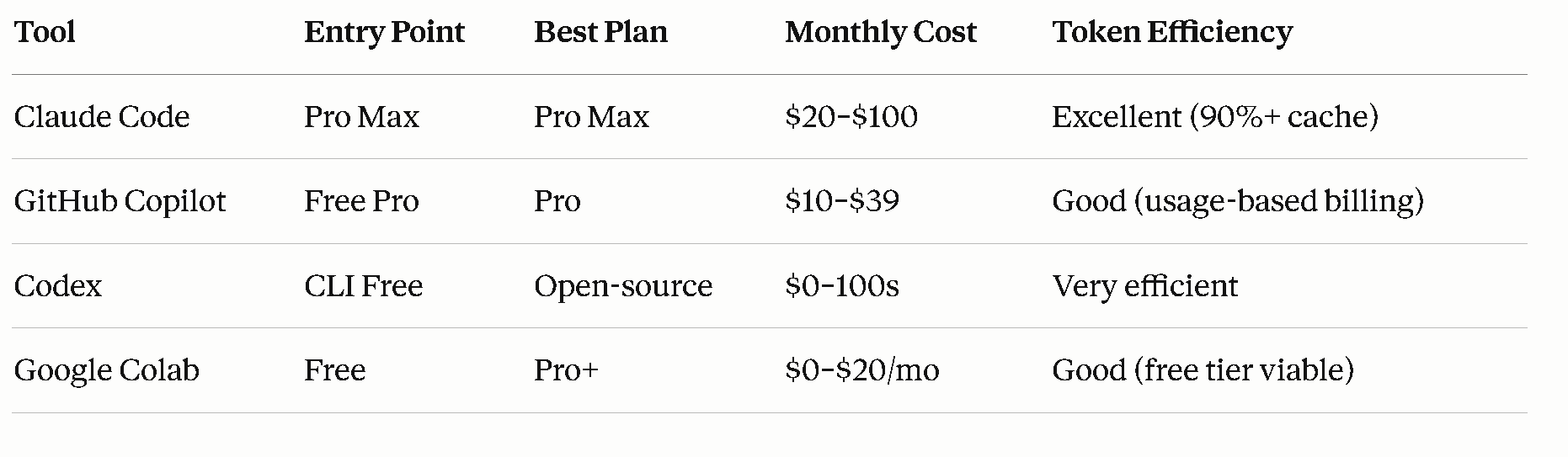
The catch: Pricing and features shifted dramatically in spring 2026. GitHub Copilot moved to usage-based billing, Claude Code experienced a brief pricing scare (more on that below), and Codex is rising as a sleeper option.
The Tools, Explained
Claude Code: The Reasoning Powerhouse
Starting price: $20/month (Pro)
Best for: Multi-file refactors, architectural decisions, reasoning-heavy tasks
Claude Code is Anthropic’s agentic coding assistant. It reads your repository, edits files, runs tests, and even commits code to GitHub. It’s the most “opinionated” of the bunch; Claude will reason out loud about what it’s doing, making it excellent for learning and code reviews.
Pricing Breakdown
Claude Pro ($20/month): 44,000 tokens per 5-hour window. Fine for light sessions on small projects. You’ll hit limits if you’re in a coding groove.
Claude Max 5x ($100/month): ~220,000 tokens per 5-hour window. This is where most serious developers land. The pricing jump is real, but the token allocation is excellent for extended sessions.
Claude Max 20x ($200/month): The ceiling. Only needed if you’re running multiple agents simultaneously or coding 8+ hours daily.
API Route: $3/$15 per million tokens (Sonnet 4.6), or $5/$25 (Opus 4.6). Prompt caching, where Claude reuses previous context at 10% cost, means a single debugging session can cost $5–15. Budget-conscious? Set spending limits.
The Controversy
In late April 2026, Anthropic briefly tested moving Claude Code exclusively to the Max tier ($100/month), cutting it from the $20 Pro plan. The backlash was immediate. Within hours, Anthropic walked it back; an A/B test affecting only 2% of new signups. But this signals where pricing is heading: agentic workflows are expensive to serve, and pricing tiers will likely keep separating heavy usage from casual use.
Strengths
Reasoning & explanation: Claude thinks aloud, explaining why it’s refactoring code. Perfect for code reviews and learning.
Long context window: 1M token support via API (200K on subscription) means entire codebases fit.
Caching efficiency: Over 90% of tokens in typical sessions are cache reads at 10% cost. One developer tracked 10 billion tokens across 8 months and paid only $800 on Max; what would cost $15,000 on API.
Multi-modal: Can analyze screenshots, images, and documents.
Weaknesses
Rate limits: Even Max subscribers face usage restrictions during peak times.
Terminal/CLI workflow — it's not IDE-native like Copilot, which is a genuine friction point for many developers
Pricing uncertainty — even if the Max-only experiment was walked back, the concern is real and ongoing
GitHub Copilot: The IDE Native, Now Usage-Based
Starting price: Free
Best for: Inline completions, quick chat, teams with existing GitHub workflows
GitHub Copilot is the veteran of this space. It’s deeply integrated into VS Code, JetBrains, Xcode, and Eclipse. As of June 1, 2026, it switched from “premium request” billing to usage-based billing tied to AI Credits.
Pricing Breakdown (Effective June 1, 2026)
Free: 2,000 code completions/month + 50 premium requests. Code completions are inline suggestions; premium requests cover chat, agent mode, and code review.
Pro ($10/month, or $100/year): $10 in monthly AI Credits. Inline completions stay unlimited and free. Everything else (chat, agents, code review) consumes credits.
Pro+ ($39/month): $39 in monthly AI Credits + access to more models.
Business ($19/user/month): For teams; credits pool across users.
Enterprise ($39/user/month): Full admin controls and codebase indexing.
What’s actually changing: Before June 1, you paid a flat fee and got a set number of “premium requests.” Now, every interaction is metered by token consumption. A 5-minute chat session might cost 50 credits; a code review might cost 200. GitHub provided a preview tool in May to estimate your bill before the transition.
AI Credits Deep Dive
1 AI Credit = $0.01 USD. Token costs vary by model:
GPT-4.1 and Gemini 2.5 Pro: Higher token cost
GPT-5 mini (new): Lower cost, still capable
Claude Opus 4.7 (Premium): Restricted to Pro+ tier only, not available on Pro
For teams, the big change is pooled credits. Unused credits from light users offset heavy users within the same organization. This could save significant money if your team has mixed usage patterns.
Strengths
Entry-level free tier: Seriously usable. 2,000 completions + 50 chats/month is enough for learning or hobby projects.
IDE breadth: Works in VS Code, JetBrains, Xcode, anywhere developers live.
Inline completions: The most natural workflow for code completion. Tab-complete feels fast and intuitive.
Student/OSS free access: Verified students and open-source maintainers get full access for free.
GitHub ecosystem: Native integration with PRs, issues, and GitHub Actions.
Weaknesses
Usage-based billing complexity: The shift from flat-rate to metered pricing creates unpredictable bills. A heavy agent session could surprise you.
Model restrictions: Claude Opus 4.7 is Pro+ only ($39/month). Some devs are upset about this.
Signup pause: GitHub paused new signups for individual plans as of April 20, 2026, citing infrastructure strain. This is temporary, but it signals supply stress.
Real-World Math
If you use Copilot Pro ($10/month with $10 credits):
50 quick chats to a fast model: ~$2–3
20 code reviews: ~$3–5
Remaining: $2–5 for exploration
Heavy agent users (2+ hours daily of agent mode) will overage and pay extra. GitHub will charge overage at standard API rates once credits are exhausted.
Codex CLI: The Open-Source Dark Horse
Starting price: Free (open-source)
Best for: Cost-conscious developers, token-efficient workflows, privacy concerns
Codex CLI is OpenAI’s terminal-based coding agent, released as open-source under Apache 2.0. You use it via the terminal (not IDE-integrated) and pay only for the underlying models via ChatGPT subscription or API key.
Pricing Breakdown
Tool cost: $0. It’s open-source.
Model cost: You bring your own API key or ChatGPT subscription. Using GPT-4 Turbo via API: ~$3 per million input tokens, $12 output. Using ChatGPT Plus ($20/month): similar to Copilot Pro in practice.
The Token Efficiency Angle
Here’s why Codex is getting attention: OpenAI claims Codex is ~4x more token-efficient than Claude Code. That means the same task consumes a quarter of the tokens. For developers using API billing, this is huge. A debugging session that costs $15 with Claude might cost $3.75 with Codex.
However, there is a performance trade-off: on SWE-Bench (software engineering benchmarks), Claude Code’s verified score is higher. So you’re trading performance for cost, which is fine if your tasks are straightforward.
Strengths
Cost transparency: No subscription lock-in. Pure pay-as-you-go.
Token efficiency: Claims 4x better than competitors. If true, this compounds at scale.
Open-source: Inspect the code, contribute fixes, run it offline if needed.
No vendor lock-in: Bring any OpenAI API key.
Weaknesses
Terminal-only: No IDE integration. You’re copying/pasting or piping code through the CLI.
Lower benchmark scores: Trails Claude Code on SWE-Bench Verified.
Smaller community: Fewer tutorials, fewer edge cases documented.
API key management: You own your credentials. More flexibility, but also more responsibility.
Google Colab VS Code Extension: The Compute Wildcard
Starting price: Free
Best for: Data science, ML training, GPU-accelerated tasks, free compute
This is the newest player. Google released an official Colab extension for VS Code in November 2025. It’s not a coding assistant per se, it’s a compute platform. But it changes how you pair program.
Pricing Breakdown
Free tier: T4 GPU and TPU v5e access, 12-hour session limit.
Colab Pro ($11.99/month): Premium GPUs (A100), longer sessions, higher usage priority.
Colab Pro+ ($47.99/month): Maximum compute and priority.
The extension lets you write code in VS Code and execute it on Colab’s free/paid runtimes. For pair programming, this means you can have Claude Code or Copilot suggest code, then run it instantly on free GPUs in VS Code.
How It Changes the Game
You’re not using Colab as your AI assistant. Instead, you use it as your compute layer. Pair this with Claude Code or Copilot for suggestions, then hit “run cell” to execute on Colab’s hardware, all without leaving VS Code.
Strengths
Free GPU access: Legitimate, no-catch-attached T4 access.
IDE integration: Runs Jupyter notebooks in VS Code seamlessly.
Data science focus: Perfect for ML workflows.
No vendor lock-in: Notebooks are standard .ipynb files.
Weaknesses
Not an AI assistant: Colab extension doesn’t offer code suggestions. It’s purely computational.
Session limitations: Free tier has 12-hour limits and variable resource allocation.
Integration gaps: Some Colab web features (like
userdata.get()) don’t work in VS Code yet.Not for production: Colab is for prototyping and training, not deploying production services.
Head-to-Head: Pick Your Weapon
“I’m just learning to code.”
Go with: GitHub Copilot Free
Why: 2,000 completions/month is genuinely usable. You learn faster with an AI suggesting patterns, and the free tier removes financial friction.
“I need deep reasoning and architectural help.”
Go with: Claude Code Pro ($20) or Max 5x ($100)
Why: Best reasoning and explanation of any tool here — ideal for learning. Start on Pro, upgrade to Max 5x if you hit limits twice a week.
“I live in VS Code and want integrated AI.”
Go with: GitHub Copilot Pro ($10) + Claude Code API ($5–15 per session)
Why: Copilot’s inline completions are fastest in the IDE. Claude for deep work. The hybrid stack costs ~$20–30/month for light to moderate use.
“I’m cost-sensitive and pragmatic.”
Go with: Codex CLI (free tool) + API key ($20–30/month)
Why: Token efficiency + open-source + pay-as-you-go. You control spending, and the math is clear.
“I do ML and data science heavily.”
Go with: Google Colab Pro ($12) + Copilot Pro ($10)
Why: Free GPU access in VS Code (Colab extension) + inline completions (Copilot). For ML, this combo is an unbeatable value.
“My team/company is paying.”
Go with: GitHub Copilot Business ($19/user/month)
Why: Pooled credits, admin controls, compliance integrations, SOC 2. GitHub handles the complexity.
Beyond Pricing: The Real Decision Tree
Speed of Iteration
GitHub Copilot wins. Inline completions in your editor are fast.
Claude Code is slower but deeper.
Codex CLI requires terminal workflow overhead.
Code Quality
Claude Code reasons better and explains decisions.
GitHub Copilot is solid, especially with Pro+ tier (more model access).
Codex CLI trails on benchmarks but is pragmatic.
Learning & Upskilling
Claude Code (its explanations teach you).
GitHub Copilot (patterns are easy to learn from).
Codex CLI (more of a tool than a teacher).
Privacy & Data
GitHub Copilot: Microsoft/OpenAI handles it. SOC 2 certified for enterprise.
Claude Code: Anthropic doesn’t train on your code by default.
Codex CLI: You control your API key and data flow.
Google Colab: Google owns it. GDPR-compliant, but standard Google terms apply.
Rate Limits & Reliability
Claude Code: Rate limits exist even at the Max tier, especially during peak hours. But caching makes sessions efficient.
GitHub Copilot: Usage-based billing means potential surprise costs if you’re not monitoring.
Codex CLI: API rate limits from OpenAI; standard OpenAI SLA applies.
Google Colab: Free tier is variable (GPU assignment, session interruptions). Pro tier is more stable but limited.
The Combo Stack Strategy: Why One Tool Isn’t Enough
For serious developers, the best setup is not a single tool. It’s a combo:
Light development ($30–40/month):
GitHub Copilot Pro ($10): inline completions everywhere
Claude Code Pro ($20): deep reasoning when needed
Free Colab tier: GPU experiments
Medium development ($50–70/month):
GitHub Copilot Pro ($10): inline suggestions
Claude Code Max 5x ($100): primary IDE via terminal
Colab Pro ($12): ML workloads
Heavy development ($100+/month):
GitHub Copilot Pro+ ($39): model access
Claude Code Max 20x ($200): unlimited reasoning
Colab Pro+ ($48): GPU priority
Optional: Cursor ($20) or Windsurf ($15): specialized IDE
Cost-conscious power user ($25–30/month):
GitHub Copilot Free or Pro ($0–10)
Codex CLI + OpenAI API ($10–20, usage-based)
Free Colab — GPU access
Five Tips for Pair Programming Success (Beyond Tool Choice)
1. Let the AI Fail Gracefully
Don’t wait for perfect suggestions. Use rough AI outputs as a starting point, refactor, and iterate. You’re a pair; you’re responsible for quality.
2. Prompt Craft Your Requests
Bad request = bad output, even from great tools. Spend 30 seconds writing a clear prompt. Example:
❌ “Write a function”
✅ “Write a function that takes a list of user objects, filters by
status='active', and returns their email addresses. Error handling for missing email field.”
3. Use Long Context Windows
If your tool supports 1M tokens (Claude Code via API, GitHub Copilot with larger models), load your entire codebase. The AI makes better suggestions with full context.
4. Leverage Caching & Memory
Claude Code caches are magic. Run a 5-hour session, and you’ll burn minimal input tokens. GitHub Copilot’s pooled credits work similarly on team plans.
5. Version Control Everything
Pair programming = code churn. Commit frequently. Use branches for experimental AI suggestions. This makes it easy to roll back if the AI goes off the rails.
The Honest Truth About April 2026
Both moves signal the same thing: agentic workflows are expensive to serve, and pricing tiers will keep separating heavy users from casual ones. Expect pricing to move upward for heavy agentic use. If you’re a power user, lock in your preferred plan now. If you’re just starting, begin with the free tier and upgrade only when you hit real limits, not just because the tool might hit you later.
What’s your current pairing setup? Drop a comment below or reply to this post. I’m curious about the tool stack you're using in 2026 and whether the pricing shifts are pushing you toward alternatives.
Currently, I don’t use any of these, what a great analysis! I love seeing the information all laid out like this!