[Free Tutorial] How To Create A Bubble Map Without Writing A Line Of Code?
SAS Studio generates the code for you, so it is perfect for beginners

Displaying data on a map adds new perspectives. It can tell a complete story on its own. SAS Studio made displaying data on maps easy. Moreover, customizing the map with colors and bubbles adds a new dimension to your data. This section will walk you through the process using real-life data. It will show you step-by-step how to download the data and prepare it to be displayed on a map in a few simple steps.
Sign up to SAS Studio for free:
Bubble Map
The Bubble Map task creates a map that is overlaid with a bubble plot. For this example, we will use NYC crime data to create a bubble map showing the crime rate across the boroughs in 2018. The data is available through the NYC Open Data Project website.
The dataset is in my book’s GitHub account with the name: NYPD_Complaint_Data_Current__Year_To_Date.csv,
https://github.com/Apress/Learn-Data-Science-Using-SAS-Studio-2nd-ed/blob/main/Datasets/Chapter%203/NYPD_Complaint_Data_Current__Year_To_Date.csv
Or you can download the dataset from this URL:
You can download the 2018 NYPD Complaint Data from this link: https://www.kaggle.com/datasets/mihalw28/nypd-complaint-data-current-ytd-july-2018/data?select=NYPD_Complaint_Data_Current_YTD.csv
The most recent data is available for downloading at the NYC Open Data Project website. You will find the data file in the Datasets folder, or you can download the dataset from this link:
https://data.cityofnewyork.us/Public-Safety/NYPD-Complaint-Data-Current-Year-To-Date-/5uac-w243/data
To download the current-year dataset from the link above, follow the steps in Figure 3-44: click Export, then select CSV.
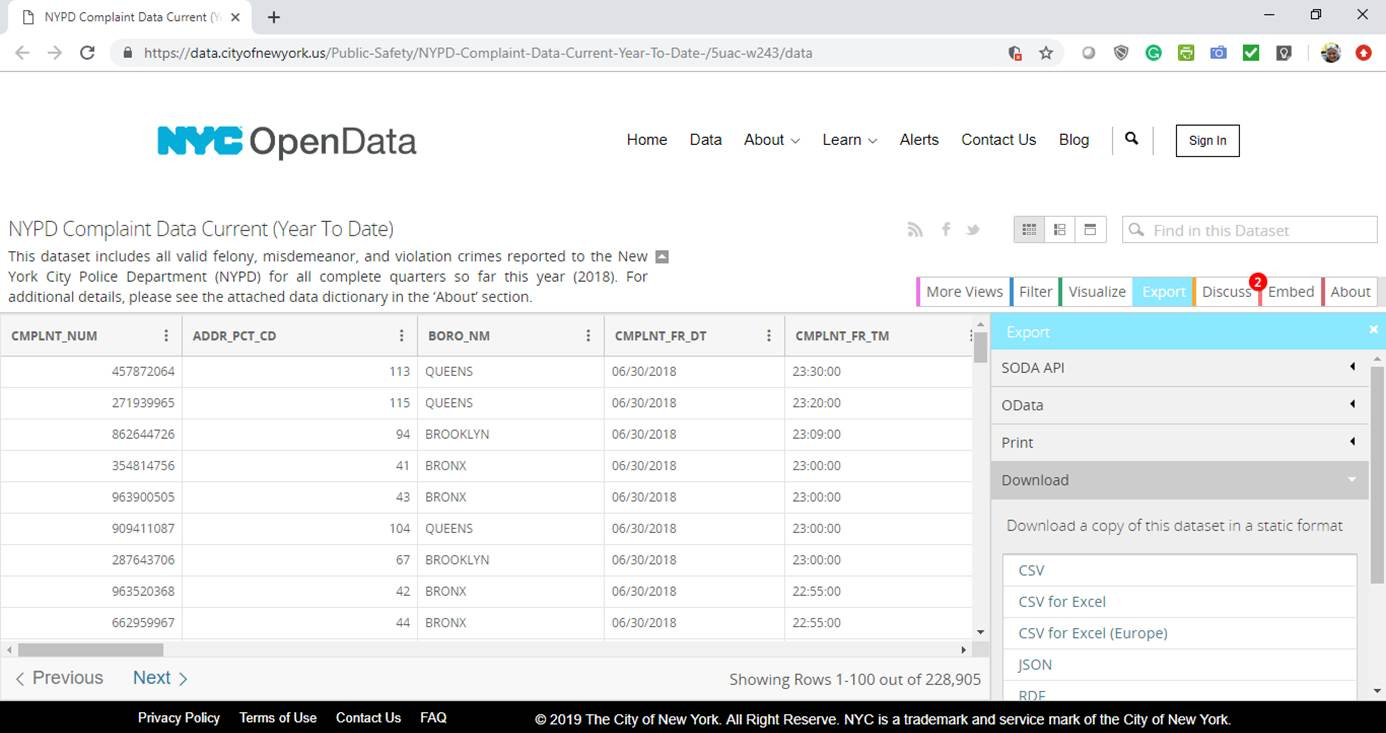
Figure 3-44. NYPD compliant data - NYC OpenData
The dataset contains a massive amount of information. Much investigation and analysis can be done on this data. For example, what is the highest crime type in every borough? What is the most likely time of day for crimes to occur? On which day of the week do the highest number of crimes occur?
For this example, we are interested solely in answering: which borough has the highest crime rate, and which has the least?
To answer this question, we need the following three columns: Borough, Longitude, and Latitude. Hence, we drop all the other columns. Then we count the number of crimes in each borough and represent it with a bubble on a map.
After cleaning and preparing the data, we have the following dataset, as shown in Table 3-3.
Table 3-3. Number of Crimes Per Borough
Borough          Count of Crimes             Latitude               Longitude

BRONX             50153                       40.82452               -73.8978
BROOKLYN          67489                       40.82166               -73.9189
MANHATTAN         56691                       40.71332               -73.9829
QUEENS            44137                       40.74701               -73.7936
STATEN ISLAND     10285                       40.63204               -74.1222
To load the data, we write Listing 3-5 in the SAS Studio. You can load Listing 3-5.sas from the Example Code folder. Click Run.
Listing 3-5. Creating a Dataset for the Number of Crimes Per Borough
data NYC_crime;
     input Borough $13.;
     datalines;
BRONX
BROOKLYN
MANHATTAN
QUEENS
STATEN ISLAND
;
run;
data NYC_crime_dim;
     set nyc_crime;
     input count Latitude Longitude;
     datalines;
50153 40.82451851 -73.897849
67489 40.82166423 -73.91885603
56691 40.71332365 -73.98288902
44137 40.74701026 -73.79358825
10285 40.63203653 -74.1222402
;
run;In this program, we did not import the raw data file. We inserted the table values into the code using the DATALINES keyword in the DATA step. In Listing 3-5, we have two DATA steps. The first one is called NYC_crime. The second line uses the INPUT statement to specify the columns’ names and types. In this table, we define only one column as the Borough names, and its type is character because we used the $. The maximum number of characters is 13. Then we use the DATALINES statement to insert the actual values and end it with a semicolon.
The second DATA step creates another table called NYC_crime_dim to insert the borough’s dimensions and the number of crimes in each one. This table is initialized by the previous table, nyc_crime, by using the SET statement. Again, we use the INPUT statement to specify that we shall add three more columns to the borough. We add the count, latitude, and longitude. Remember to leave a space in between the column names and do not use commas. Again, use the DATALINES to insert the actual values and end it with a semicolon.
After running Listing 3-5, two new tables called NYC_crime and NYC_crime_dim will be created in the WORK library. To check the output table, click Libraries à WORK, under it, you will find NYC_crime and NYC_crime_dim. If not, refresh your libraries as we explained in Chapter 2.
Now, click on Tasks and Utilities à Tasks à Map à Bubble Map as Figure 3-45.
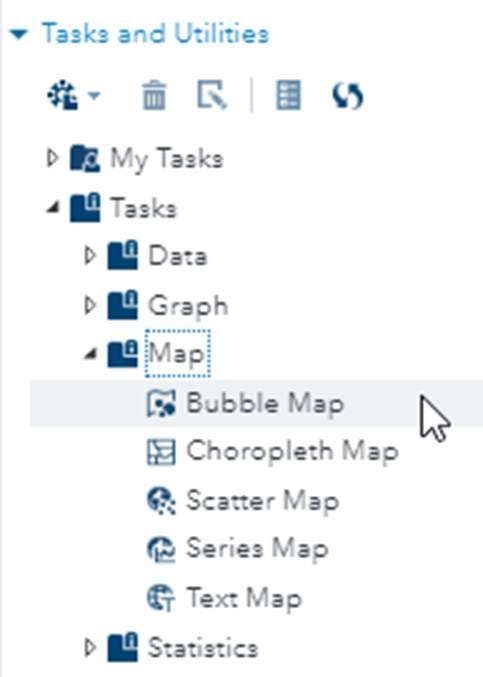
Figure 3-45. Create a bubble map
As in Figure 3-46, enter the dataset: WORK.NYC_CRIME_DIM in DATA. In Roles, select Latitude and Longitude. In the Bubble size, select count, which is the count number of crimes. Finally, in the Group, select the Borough column.
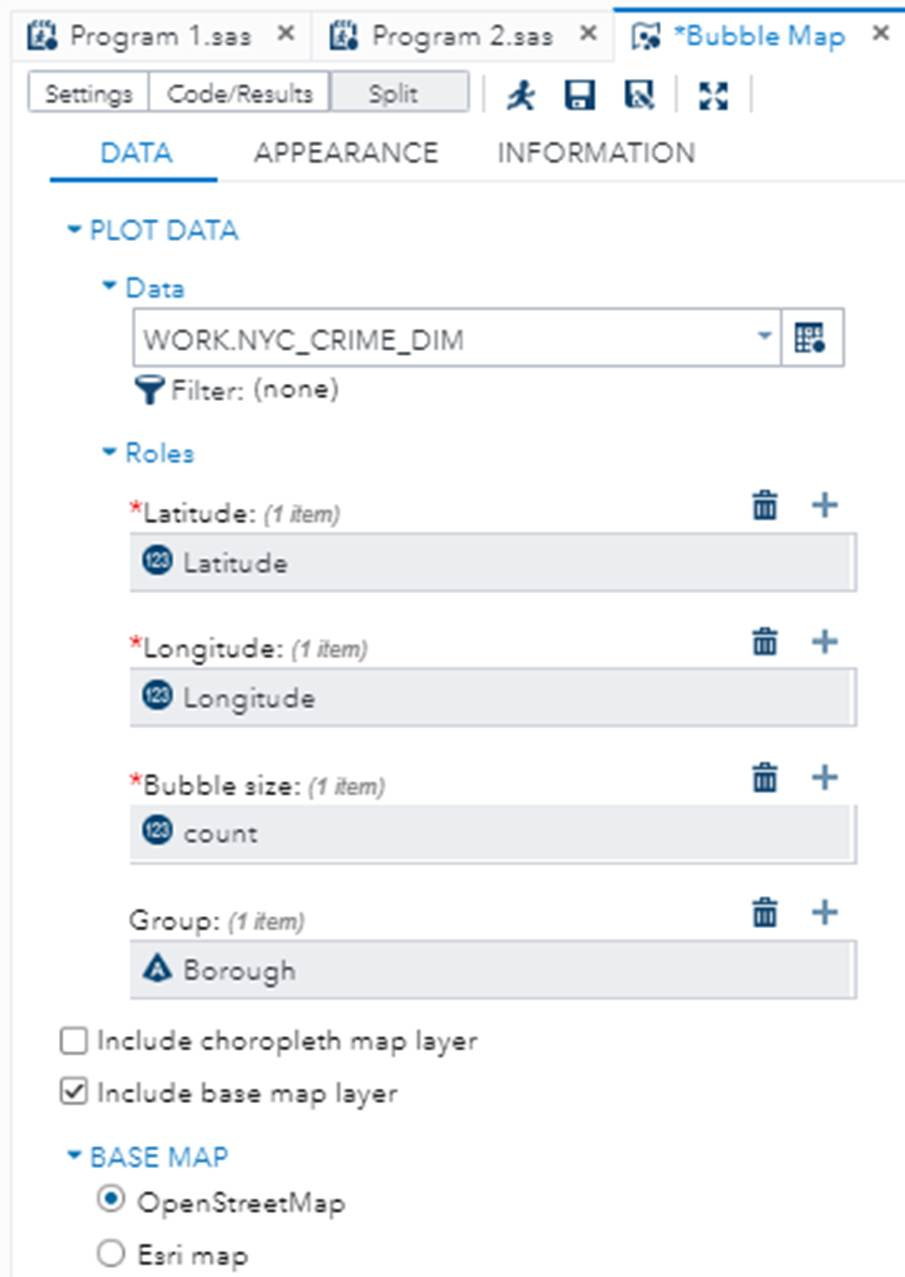
Figure 3-46. Number of crimes per borough
The Base map is OpenStreetMap. Later in the chapter, we shall try the Esri map to check the difference in the output. Leave the rest of the defaults and click Run. The following bubble map of Figure 3-47 will be displayed.
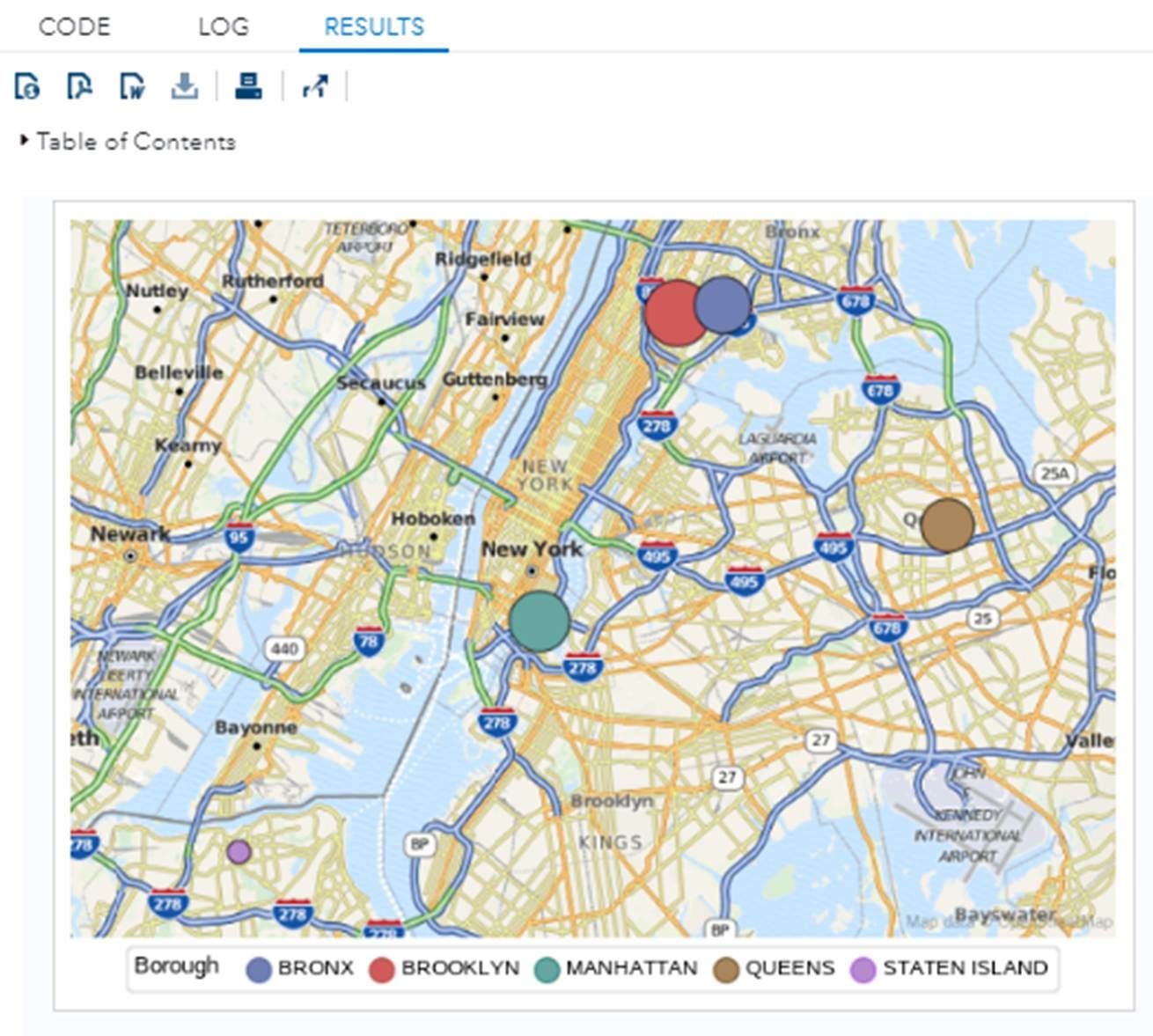
Figure 3-47. Number of crimes per borough
It is clear from the bubble size that Brooklyn has the highest crime rate, while Staten Island has the lowest. SAS Studio automatically adjusts the bubble location, size, and color. Moreover, it adds a legend at the bottom of the map for the Borough color codes.
Now, let us enhance the appearance of the bubble map. We can add a label to the bubble with the count of crimes and add a title to the map. As shown in Figure 3-48, under the Appearance tab, in DATA LABELS, in Bubble label, choose the count column from the dataset. Then, under Label options, in Font weight, select Bold. In the Label position, choose Center. Finally, in the Title and Footnote, in Title, type: “Number of crimes in NYC Boroughs.”

Figure 3-48. Enhance the appearance
Click Run to check the new changes. The output would be Figure 3-49.
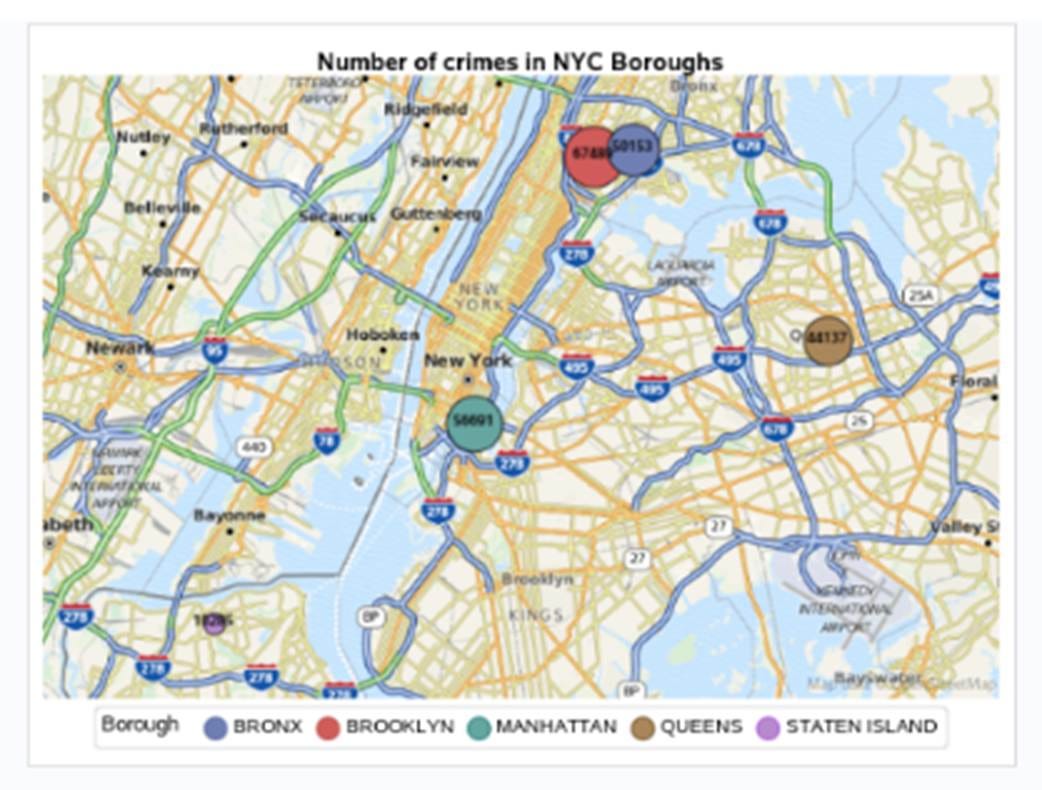
Figure 3-49. Number of crimes in NYC boroughs
Here is the code (Listing 3-6) that SAS Studio auto-generates from our options via the user interface.
Listing 3-6. Creating a Dataset for the Number of Crimes Per Borough
ods graphics / reset width=6.4in height=4.8in;
ods graphics / reset width=6.4in height=4.8in;

proc sgmap plotdata=WORK.NYC_CRIME_DIM;
	openstreetmap;
	title ‘Number of crimes in NYC Boroughs’;
	bubble x=Longitude y=Latitude size=count/ group=Borough datalabel=count
		datalabelpos=center datalabelattrs=(color=CX0f0e0e size=7pt weight=bold)
		name=”bubblePlot”;
	keylegend “bubblePlot” / title=’Borough’;
run;

ods graphics / reset;
title;
SAS Studio is powerful and provides two types of base maps: OpenStreetMap and Esri maps. Now, let us try the other BASE MAP type. As shown in Figure 3-50, return to the DATA tab, and select the Esri map and Run. The output map will be Figure 3-50.
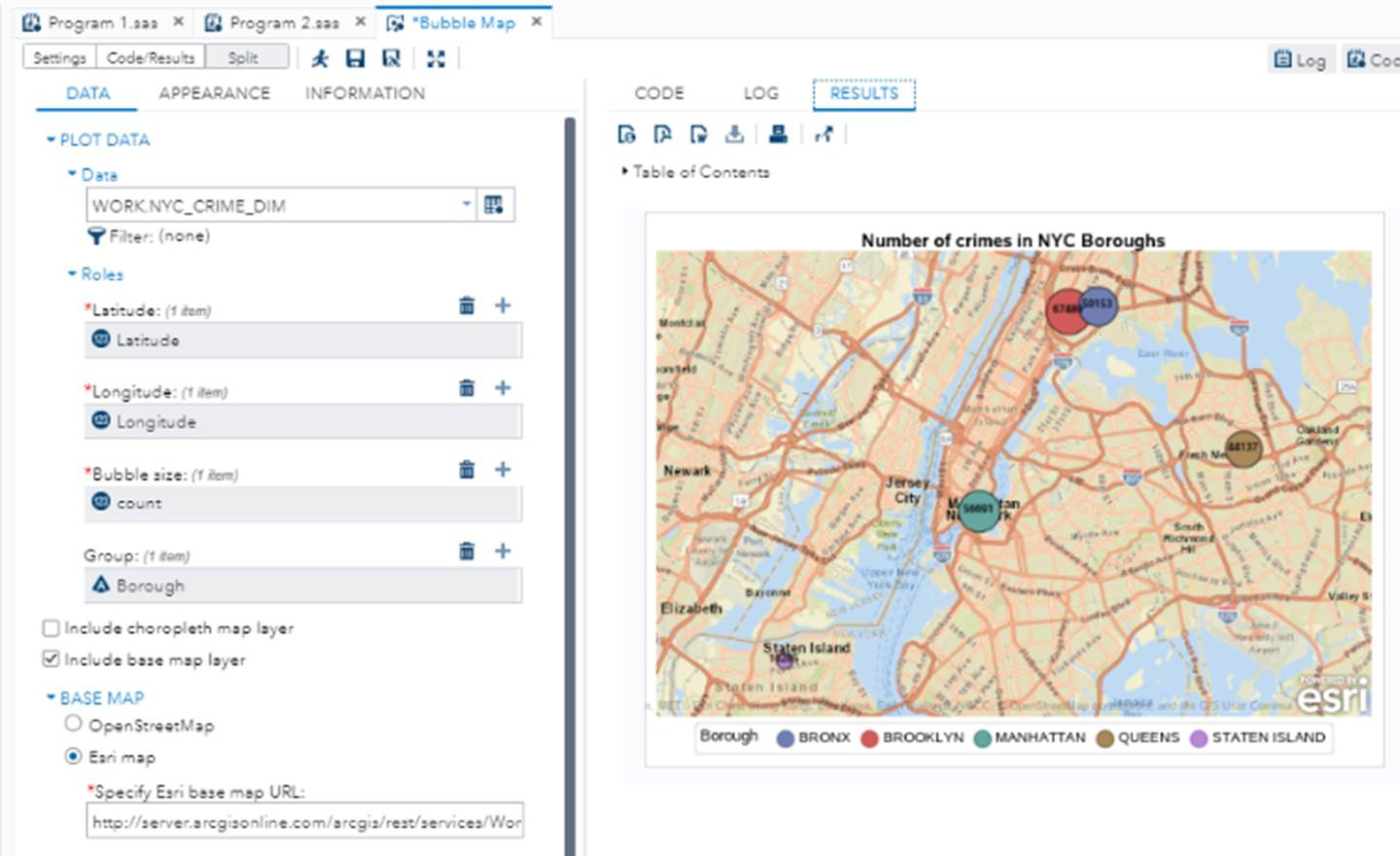
Figure 3-50. The map using Esri maps
SAS Studio will generate the following code for this Esri map option, as shown in Listing 3-7.
Listing 3-7. Generate the Map Using Esri Map
ods graphics / reset width=6.4in height=4.8in;

proc sgmap plotdata=WORK.NYC_CRIME_DIM;

        esrimap url= 			‘http://server.arcgisonline.com/arcgis/rest/services/World_Street_Map/MapServer’;

     title ‘Number of crimes in NYC Boroughs’;

    	bubble x=Longitude y=Latitude size=count / group=Borough               		datalabel=count datalabelpos=center
		datalabelattrs=(color=CX0f0e0e size=7pt weight=bold)               		name=”bubblePlot”;
     keylegend “bubblePlot” / title =’Borough’;
run;

ods graphics / reset;
title;
This snippet is from my book, Learn Data Science Using SAS Studio, From Clicks to Code, Second Edition